●
LIVE DEMO
Generated using
Instruct UI - An AI for Blazor UI Generation
## What's implemented
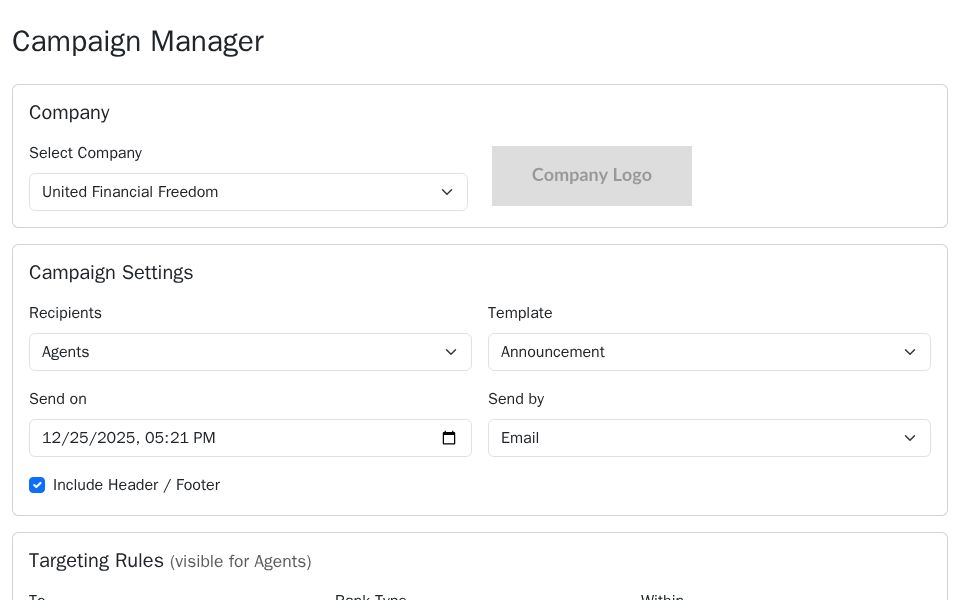
- Company selector with logo preview.
- Campaign Settings card: recipients, template, send on (datetime-local), send by and include header/footer checkbox.
- Conditional Targeting Rules card shown when Recipients == "Agents": To, Rank Type, radius (InputNumber) and ZipCode, with an agents-found info alert.
- Content card: Subject (required), attachments dropzone UI and action buttons, rich-text toolbar and a large InputTextArea for the message.
- Action button to send email.
## Key components
- Blazor input components: InputSelect, InputText, InputNumber, InputCheckbox, InputTextArea.
- Standard HTML inputs: datetime-local, buttons, image tag.
- Bootstrap layout and form classes (card, row, col-*, form-control, form-select, input-group).
- Model class: CampaignSettingsModel with a [Required] Subject property.
## How it works
- Two-way binding uses @bind-Value and @bind for model properties (e.g., @bind-Value="model.Recipients", @bind="model.SendOn").
- Conditional rendering displays the Targeting Rules block when model.Recipients == "Agents".
- The page holds a local model instance (new CampaignSettingsModel()) in the @code block; UI fields read/write that instance directly.
- No EditForm or DataAnnotationsValidator is present in the Razor file, so DataAnnotations on the model (e.g., [Required]) are not enforced automatically.
- Attachment area is a static UI placeholder; no file input binding or upload handling is implemented in the provided code.
## Styling
- Uses Bootstrap utility and layout classes: container-fluid, row, col-*, card, btn, form-control, form-select, input-group.
- Font Awesome icons are referenced in buttons and alerts (icons require including the FA stylesheet).
- Responsive behavior relies on Bootstrap grid (col-md-* / mt-md-0) for small-to-large breakpoints.
## Reuse steps
1. Add the CampaignSettingsModel.cs to the project and include the component route (/campaign-manager).
2. Ensure Bootstrap and Font Awesome CSS are included (wwwroot/index.html or _Host.cshtml).
3. Import Microsoft.AspNetCore.Components.Forms if EditForm or InputFile components will be added.
4. Replace the static attachment area with an InputFile and wire file upload handling or S3 upload service.
5. Add an EditForm around inputs and a DataAnnotationsValidator to enable model validation for [Required] properties.
6. Implement backend services for sending email and querying agents (inject via Program.cs/Startup and call from event handlers).
## Limitations & next steps
- Validation: DataAnnotations exist but no EditForm/DataAnnotationsValidator is wired; add them for validation and field-level validation messages.
- File upload: attachment UI is visual-only; implement InputFile handling and server-side storage or S3 integration.
- Actions: Send Email Now button has no click handler; add an async event handler and service to process the model and queue/send messages.
- Data: Company options, templates and agents counts are hard-coded; replace with API-backed data sources and pagination for large result sets.
- Accessibility: add ARIA labels and focus management for toolbar buttons and dynamic sections.
This single-page component demonstrates layout and binding but requires service wiring, validation plumbing and file/upload handling to be production-ready.